Building a distributed application with .NET and Aspire - Part 2
- 9 minutes read - 1828 wordsThis is a follow-up to my original post on building a distributed application with .NET and Aspire. Where have I got to and what do I think of Aspire so far?
First, a recap
Background
This project was inspired by my client’s large distributed application: microservices that interact with each other and with cloud-native and third-party services, serving high baseline traffic with significant spikes, and so needing high availability, resilience, and scalability. With that many dependencies, the local development experience can suffer. My client’s shell scripts and Docker files normally work fine, but they were non-trivial to create and are harder to change and maintain.
At the same time, there was lots of talk about Aspire, Microsoft’s new tooling for building and running distributed applications, so I decided to combine the two.
What I hoped to achieve
🎯 Use .NET to explore and demonstrate the techniques/patterns/packages needed for a real-world distributed application.
This covers the basic building blocks (its own API and data store, an upstream microservice, a third-party API, asynchronous messaging) and the production concerns (scalability, resilience, observability).
🎯 Use Aspire to see how it can help.
In particular, whether it can replace custom shell scripts and Docker files, and keep the local development setup as close as possible to production, avoiding issues caused by configuration differences. Take advantage of Aspire’s out-of-the-box extras along the way: the dashboard and OpenTelemetry-based observability, integration testing against real dependencies, and deployment to Azure Container Apps or Kubernetes.
What is in the project now?
It has been 12 months since my first post on this project, and I’ve added quite a lot (Sept 2025 -> Sept 2026), albeit only when work and life allowed me the time. Here is a summary of what has been added in terms of patterns, techniques, features, and technology. In addition to what was already in place at the time of my first post, in any real-life distributed system, you will need most, if not all, of these things as well:
- Asynchronous messaging:
- Resilience:
- Message consumption retries on failure, with configurable attempts, delay and back-off, and dead-lettering to a separate topic.
- Protection against duplicate messages using a transactional inbox: KafkaFlow middleware and a deduplication table that skips duplicates and rolls back if the handler fails.
- Polly resilience pipelines on outbound
HttpClients, configured in appsettings: retry with jitter, circuit breaker, timeouts, and a fallback when the upstream is unavailable.
- Interoperability:
- Replaced Swagger UI with Scalar, and added an OpenAPI spec for the GeoIP API.
- URL-segment API versioning (e.g.
/v1.0/...) usingAsp.Versioning, working with the OpenAPI documents and Scalar. - Exposed the weather domain as an MCP server, with MCP Inspector for local testing.
- Metrics: custom metrics for cache hits/misses, database query duration, and events.
- Testing: Kafka integration tests via the Aspire
AppHostFixture, unit tests for the events consumer, a move to Microsoft.Testing.Platform, and code coverage. - Deployment:
- Deploys to a local Kubernetes cluster (Rancher Desktop) with
aspire deploy, verified by an automated deployment test script. - Scales horizontally: stateless services are just a replica count, and the stateful dependencies (Postgres, Kafka, Valkey) are pinned to a single replica for a simple containerised deployment (these would be mapped to native cloud services in production).
- Cloud-provider agnostic: Aspire’s first-party Kubernetes integration generates a plain Helm chart.
- Database migrations run as a pre-upgrade job that aborts a release if they fail.
- Deploys to a local Kubernetes cluster (Rancher Desktop) with
- Engineering:
- Upgraded to .NET 10 and pinned the SDK with
global.json. - High-performance logging with
LoggerMessage, central package management, sharedDirectory.Build.props. - CI and security fixes, and Dependabot configuration.
- Upgraded to .NET 10 and pinned the SDK with
- Docs and AI tooling:
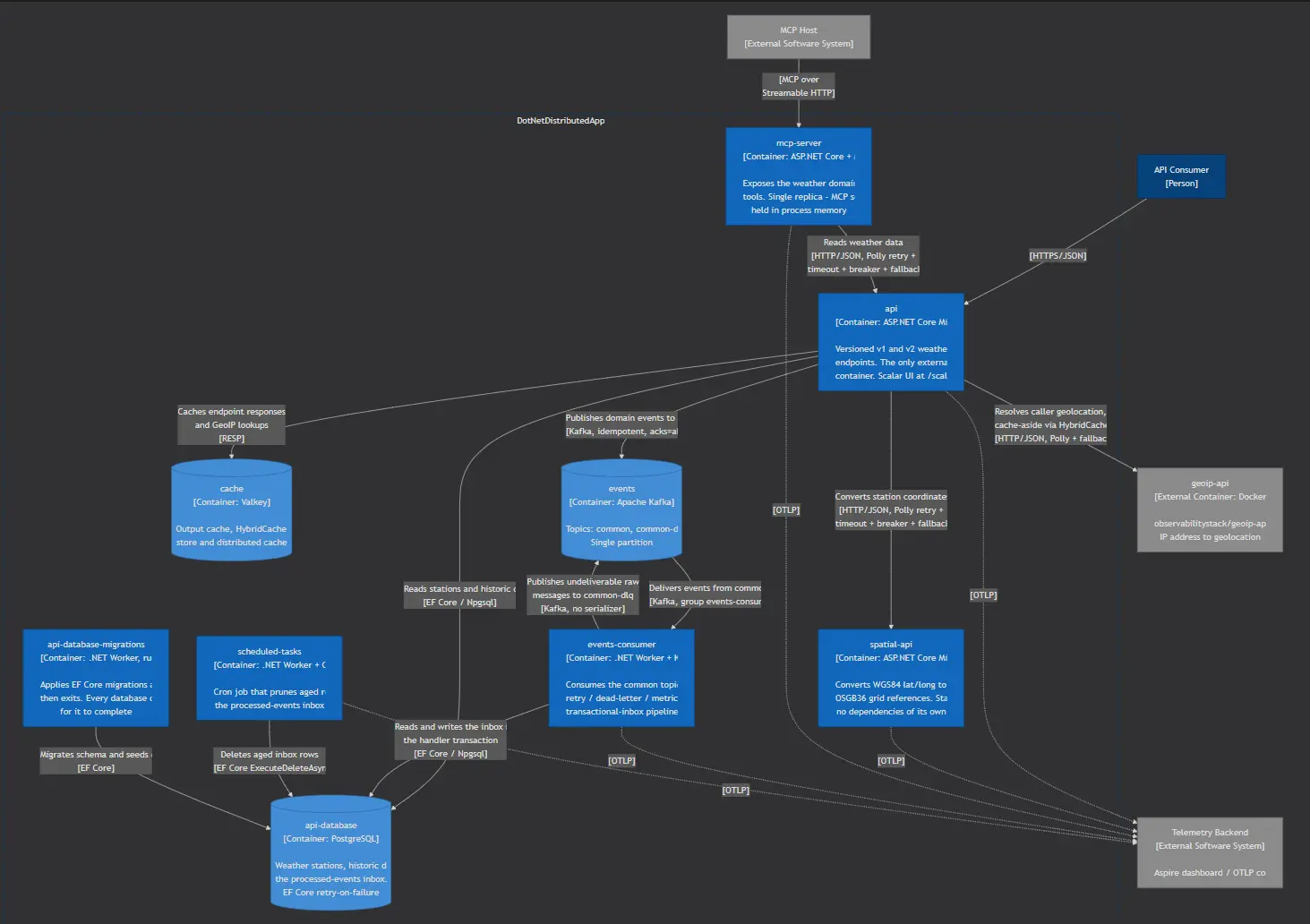
AGENTS.md/CLAUDE.mdfor AI coding agents, and C4 architecture diagram.
From an architecture point of view, it looks like this:
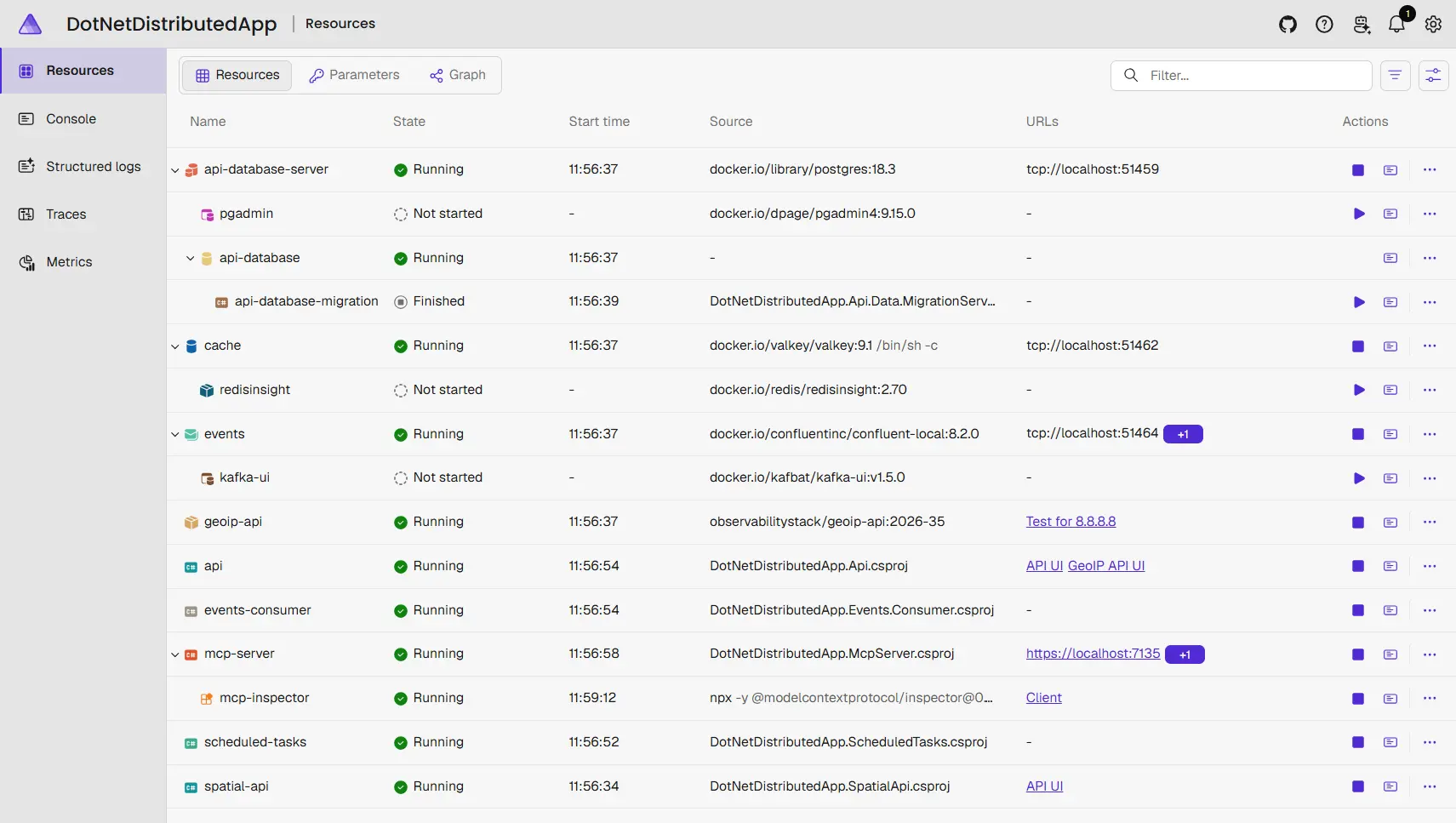
The Aspire Dashboard does a decent job of showing what is there too:
How has Aspire changed in that time?
Quite a lot! When I wrote the first post, Aspire was on v9.4. Since then there have been seven feature releases (9.5, 13.0, 13.1, 13.2, 13.3, 13.4 and 13.5) plus a steady stream of patch releases. The highlights:
- Rebrand and version jump: with 13.0 (November 2025), “.NET Aspire” became just “Aspire”, the version jumped from 9.x to 13, and it now requires the .NET 10 SDK. It is positioned as a multi-language platform, not just a .NET one.
- Polyglot support:
- Python and JavaScript became first-class in 13.0 (Uvicorn/ASGI, uv/pip, npm/yarn/pnpm, Vite).
- Later releases added Next.js (13.3), Go and Bun (13.4), and Blazor WebAssembly (13.4, preview).
- A TypeScript AppHost arrived in preview in 13.2 and was declared GA in 13.4, so you no longer need C# to orchestrate your app.
- The CLI grew up:
aspire init,aspire newandaspire update(13.0).aspire start,ps,stop,describeanddoctor, with detached mode (13.2).aspire destroyfor tearing down deployed resources (13.3).- Log and telemetry search, and
aspire integration list/search(13.4). - Distributed as a NativeAOT tool (13.3), and via npm and Nix (13.5).
- Deployment:
- A new
aspire dopipeline for build, publish, and deploy (13.0) replaced the old publishing APIs. - Docker Compose publishing became stable in 13.2.
- First-party Kubernetes deployment arrived in 13.3 (preview): a Helm engine, Ingress/Gateway API, and AKS
provisioning. 13.4 added cert-manager,
WithHelm(...)and external Helm charts, and 13.5 added persistent volumes (experimental). - Plenty of Azure additions throughout, such as Azure Functions (GA in 13.1), private endpoints, Front Door, and referencing existing resources across subscriptions and tenants.
- A new
- Dashboard:
- A GenAI visualiser (9.5), a Parameters tab (13.1), and telemetry export/import and HTTP APIs (13.2).
- A standalone
aspire dashboardfor any app that emits OpenTelemetry (13.3). - Structured search (13.4), and a visual refresh plus in-dashboard terminals (13.5, experimental).
- AI and agent tooling:
- An MCP server for the dashboard (13.0), later replaced by the AppHost MCP server.
aspire agent init(13.1) to wire up AI coding agents such as Copilot and Claude Code.- Browser logs, network requests, and screenshots available to agents (13.3, experimental).
- Developer experience: an official VS Code extension (13.0, renamed “Aspire” in 13.5), a single-file C# AppHost (experimental), and a stable Interaction Service for prompting users from the AppHost (13.5).
How did Aspire help?
Running locally and tests
As I said in my first post, running locally is a breeze. The AppHost project spins up all of your dependencies as
containers, respecting the relationships between them, waits for them to become ready, and then runs the application.
The container-based dependencies are managed by Aspire and spun down and cleaned up when the application exits.
Testing is just as easy with Aspire managing the dependencies to allow straightforward integration tests without the hassle of scripts, Docker files, different connection strings and URLs, etc.
Adding new services
Adding new projects and container-based dependencies is also easy. Configure them in the AppHost project, add
“service defaults” like OpenTelemetry, health checks, service discovery, and Aspire will handle the rest, automatically
injecting the required environment variables and configuration for connection strings, URLs, etc.
OpenTelemetry and Aspire Dashboard
Aspire has OpenTelemetry (OTel) baked in, so your console logs, structured logs, standard and custom metrics, and traces all just flow through seamlessly into the Aspire Dashboard. Whilst this is really a local-only tool, it is fantastic for viewing and visualising all the same OTel data that you would get in a deployed environment when you point it to a production-grade OTel collector/visualiser like Prometheus/Grafana. In a non-Aspire solution you either have to spin up a collector/visualiser as part of your local environment or just fall back to the plain old console logs.
Deployment
At the time of writing my first post, deployment was my biggest concern. Aspire had support for deploying into Azure, but something cloud-agnostic was only a community effort through Aspir8. Thankfully, Aspire now has first-party support for deploying to Kubernetes.
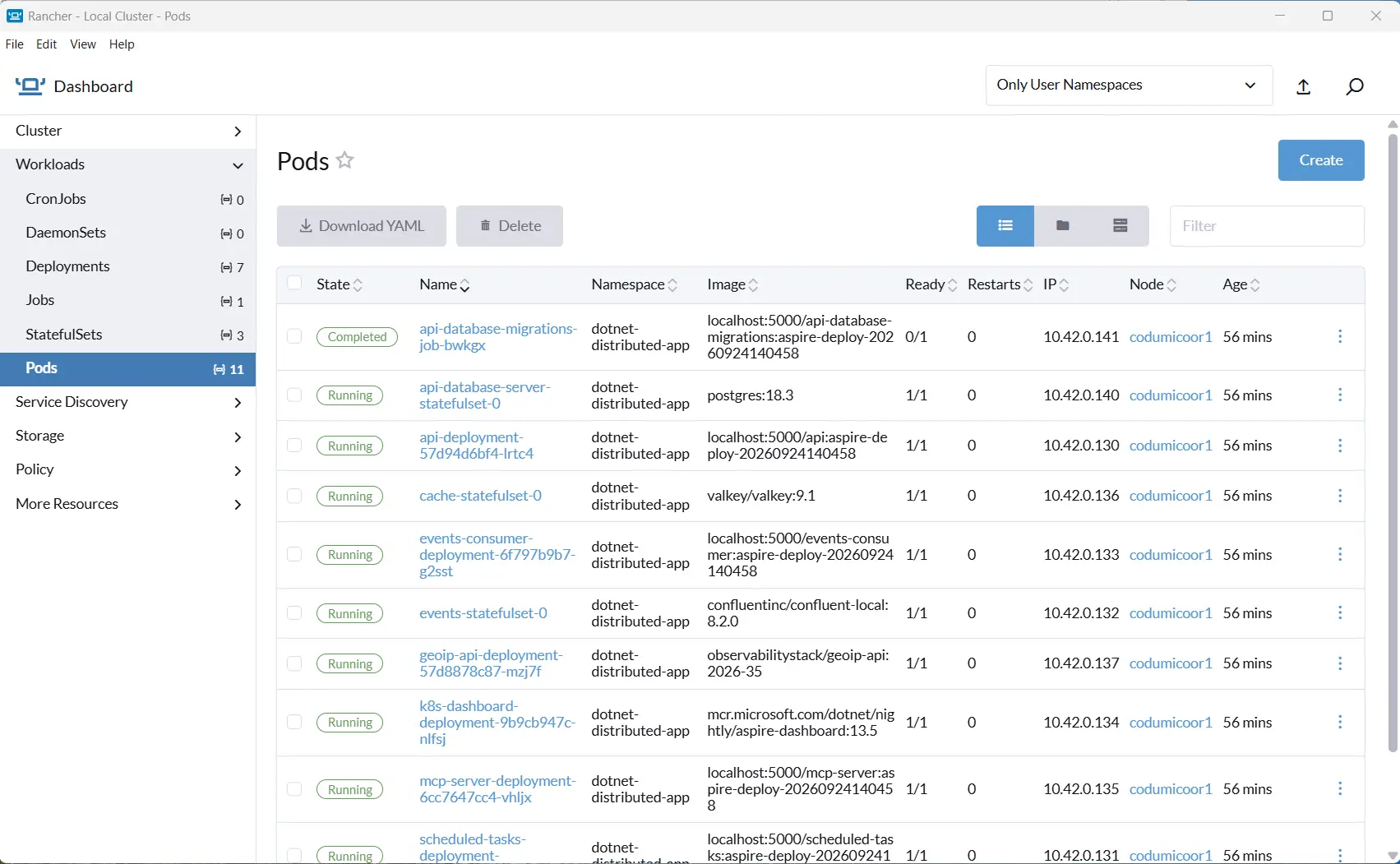
Performing a Kubernetes deployment to a local cluster running in Rancher Desktop is a great way to test your basic deployment before doing it for real to a production environment. With Aspire, you can easily deploy your application to Kubernetes using the Aspire CLI, and the Aspire Dashboard will provide you with all the necessary information to monitor and troubleshoot your application before that real deployment.
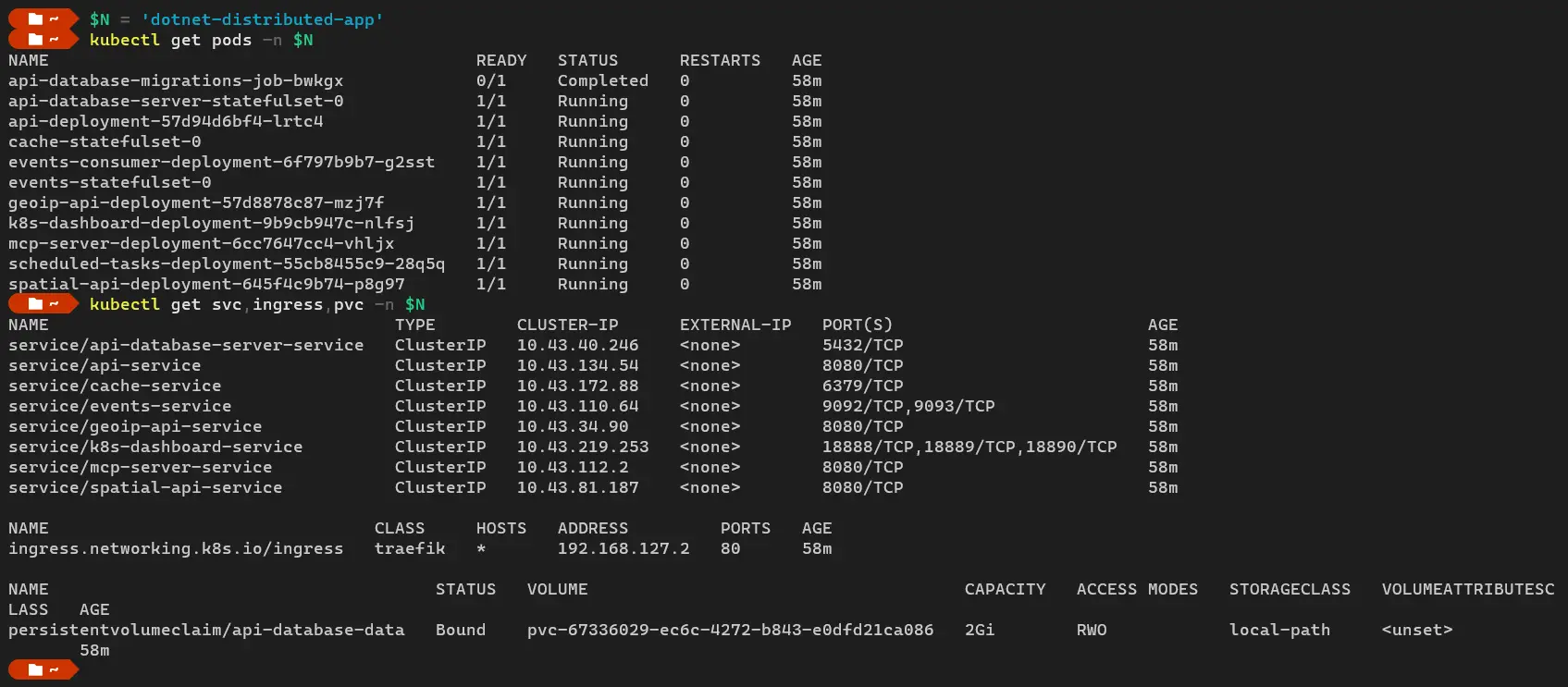
Here is everything running in the Rancher Desktop k8s dashboard:
Or via kubectl if you prefer:
Once tested, you can deploy your application to a production Kubernetes environment using the Aspire CLI in a CI/CD pipeline, either keeping your dependencies containerised or mapping them onto native cloud services.
Conclusions
For local development, Aspire is genuinely great. One AppHost starts every dependency, wires up service discovery
and connection strings for you, and gives you OpenTelemetry and the dashboard for free. It has replaced all the shell
scripts and Docker files I would otherwise be writing and maintaining, and I don’t miss them one bit.
Deployment has come a long way too. Whether you are going straight into Azure or into any Kubernetes cluster via the
generated Helm chart, aspire deploy takes the same app model you run locally and gets it running for real, which does
a lot to close the gap between dev and production.
What I like most is that you don’t have to pick between containers locally and managed services in production. With
Azure, AddAzurePostgresFlexibleServer("db").RunAsContainer() gives you a plain Postgres container on your machine and
Azure Database for PostgreSQL when you deploy, and AddAzureManagedRedis("cache").RunAsContainer() does the same for
the cache (swapping a local Redis/Valkey container for Azure Managed Redis). Kafka takes more thought, but Azure Event
Hubs speaks the Kafka protocol, so it is a sensible managed home for it.
Outside Azure, support is thinner but growing. AWS maintains its own Aspire.Hosting.AWS
integration: it can provision real SQS, SNS, DynamoDB, S3 and Kinesis resources through CloudFormation or CDK while you
develop, and since 13.0 it has a preview aspire deploy path that maps projects to ECS Fargate, Lambda functions to
Lambda, and Redis/Valkey to ElastiCache. RDS is on the roadmap
but not there yet.
Google Cloud has no first-party support at all at present. Even so, you can always point Aspire at an
existing managed service like Cloud SQL for PostgreSQL, Memorystore for Valkey or Google Cloud Managed Service for
Apache Kafka with AddConnectionString, so you’re never locked out, you
just do a bit more of the wiring yourself.
And now that the TypeScript AppHost is GA, you don’t need to know any C# to get all of that, so a JavaScript/TypeScript
team can describe their whole system in a language they already use. And the projects in your solution don’t have to
be .NET either: Aspire happily orchestrates services written in C#, JavaScript/Node.js, Python and Go out of the box,
with Java, Rust and PowerShell supported through the Community Toolkit. I think that could be what finally tempts
people outside the Microsoft world to give Aspire a proper look, because it is no longer “that .NET thing”.